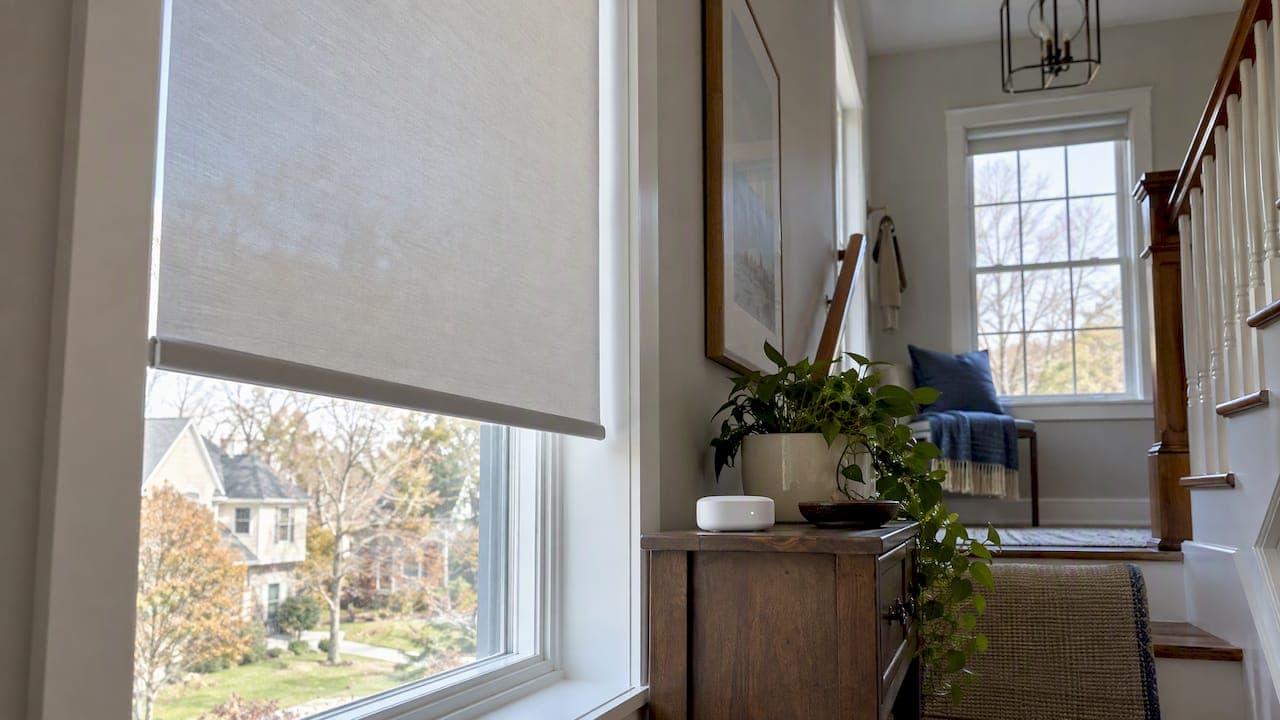
Connecting motorized shades to your smart home works one of two ways: shades built with Matter certification pair directly with Alexa, Google Home, or Apple HomeKit for local control, while older or proprietary motors need a vendor hub or bridge to talk to those same platforms. Either path works well once set up correctly, but reliable results depend on accurate measurement and professional installation. Before you buy, check the product spec sheet for a Matter logo and, if your windows are oversized or oddly shaped, schedule a measurement visit first.
TL;DR:
- Check Matter certification and the radio before buying: Thread needs a border router, while Zigbee, Bluetooth, and proprietary motors need a vendor bridge.
- Matter lets you share shades across assistant apps without repeated pairing, but only one platform controls a shade at a time, and switching can cause sync delays.
- Battery motors avoid wiring but need recharging every few months; solar power reduces upkeep, while wired motors need installation work and provide continuous power.
- Retrofit kits can reuse many roller and cellular shades, but loop cords or nonstandard tubes may not fit; inspect existing hardware before ordering.
- Avoid assigning the same shade to presence routines on multiple platforms, because conflicting triggers can make it flicker between open and closed states.
Table of Contents
- Platform Compatibility: Which Smart Home Systems Support Shades
- Connection Methods: Matter, Thread, Wi-Fi, Zigbee, and Bridges
- Setting Up Alexa, Google Home, and HomeKit: Step-by-Step
- Choosing Your Motor and Power Source
- Automation Routines Homeowners Actually Use
- Getting the Installation Right: Measurement, Mounts, and Timing
- Why a Professional Consultation Leads to Fewer Smart Shade Headaches
- Keeping Your Smart Shades Secure and Private
- Apps and Software for Controlling Smart Shades
- Upgrading Existing Shades for Smart Integration
- Energy Savings From Smart Shading
- An Installer's Perspective on Getting Automation Right the First Time
- Schedule Your Free In-Home Smart Shade Consultation
- FAQ
- Sources
Platform Compatibility: Which Smart Home Systems Support Shades
Alexa, Google Home, and Apple HomeKit all support motorized window shades, but how well they work together depends on whether the shade is Matter certified. Matter is a shared smart home standard that lets a single device connect to multiple platforms at once instead of locking you into one ecosystem.
Alexa's developer documentation lists window coverings as a supported Matter device category, with specific clusters mapped to Alexa's capability interfaces so shades respond to voice commands and app controls the same way a Matter-certified light or plug does. Google Home follows a similar model, and HomeKit has supported shades natively for years, now extending that support to Matter-certified products from other brands.
Before buying, confirm compatibility through a few reliable checks:
- Look for the Matter logo on the packaging or product page, not just a general "smart home compatible" label.
- Check the manufacturer's supported device list for your specific assistant (Alexa, Google Home, or HomeKit).
- Read the spec sheet for the radio type (Wi-Fi, Thread, Zigbee, or Bluetooth) since this determines what hardware you will need.
Matter certification matters because of multi-admin support: Google's Matter setup guide confirms that a Matter device can be added to multiple certified apps at once, so the same shade can respond to an Alexa routine and a Google Home automation without re-pairing. One practical limit worth knowing: only one platform actively drives the shade at any given moment, so expect small sync delays if you jump between apps.
Connection Methods: Matter, Thread, Wi-Fi, Zigbee, and Bridges
Smart shades reach your assistant through a handful of different paths, and the one your shade uses determines what else you need to buy.
- Matter over Thread relies on a low-power mesh network and needs a Thread border router, often built into newer Echo or Google Nest speakers, to connect shades locally without depending on the internet.
- Matter over Wi-Fi skips the mesh network and connects shades directly to your router, which is simpler to set up but draws more battery power and depends on your home Wi-Fi staying stable.
- Cloud-based Wi-Fi motors (non-Matter) connect through the manufacturer's own cloud service and vendor app, which works fine day to day but can lag or fail during an internet outage.
- Zigbee, Z-Wave, Bluetooth, and proprietary RF motors are common in older or budget shade lines and almost always require a vendor hub or bridge, a small box that translates the motor's signal into something Alexa, Google, or HomeKit can understand.
If your shades use one of these legacy radios, the bridge sits between the motor and your router, usually wired via ethernet or plugged into power near the main living area. Before buying, check which radio your motor uses first. Many motorized shade systems need a bridge to integrate with major platforms, and planning for one early saves a frustrating return trip later.
Setting Up Alexa, Google Home, and HomeKit: Step-by-Step
Once you know your shade's connection type, commissioning takes just a few steps, whether you are doing it yourself or an installer is walking you through it on install day.
For Matter-certified shades, Amazon's Alexa documentation outlines the flow: an Echo or eero device acts as the Matter administrator, discovering the shade over Bluetooth Low Energy and pairing it using a QR code or numeric pairing code printed on the shade or its remote. Amazon's docs specifically note that Thread-enabled Echo or eero devices are needed to test and commission Matter over Thread setups, so check your speaker model if the shade uses Thread rather than Wi-Fi.
Once paired to one platform, Matter's multi-admin feature lets you share the same shade with a second app, such as adding an Alexa-paired shade into Google Home, without starting the pairing process over.
For non-Matter shades, the process runs through the manufacturer's own app first: pair the motor to the vendor app, then use that app's "link to Alexa" or "link to Google Home" option to expose the shade to your assistant.
Typical snags and quick fixes:
- Shade not discovered: confirm the motor has a charged battery or active power source before pairing.
- Pairing fails repeatedly: update the motor's firmware through the vendor app first.
- Voice commands work but automations do not: recheck that the shade was added to the right room or group in the assistant app.
Pro Tip: Keep your phone close to the shade's remote or motor during pairing. Bluetooth-based commissioning can fail from across the room even when Wi-Fi signal looks strong.
Choosing Your Motor and Power Source
The motor you choose affects both how shades connect and how much maintenance they need down the road.
- Wired motors draw continuous AC power, which makes them the most reliable for daily automation but requires an electrician or installer to run wiring during a renovation or new build.
- Battery and rechargeable motors retrofit onto existing windows far more easily, since there is no wiring to run, but need recharging or battery swaps every few months depending on use.
- Solar-charged motors extend battery life significantly for shades near south or west-facing windows, cutting down on manual recharging almost entirely.
Battery placement matters more than most homeowners expect. An installer who positions the battery pack for easy access, rather than tucked behind a headrail, saves you from climbing a ladder every time it needs a charge. For battery life expectations and swap schedules, our guide on motorized shade batteries walks through realistic runtimes by usage pattern.
Cordless, child-safe lift mechanisms are worth prioritizing regardless of motor type. They remove dangling cords entirely, which matters most in bedrooms and nurseries, and most motorized shades are cordless by design already. One trade-off to flag: compact wired motors sometimes support more automation features than battery units of the same price, since they are not limited by power conservation.
Automation Routines Homeowners Actually Use
Once your shades are connected, a few automation patterns cover most of what homeowners want day to day.
- Sunrise and sunset schedules close shades at dusk for privacy and open them at sunrise, syncing light exposure with your actual local daylight rather than a fixed clock time that drifts with the seasons.
- Presence or geofence triggers lower shades when everyone leaves the house and raises them when the first person arrives home, though it is worth avoiding stacking the same shade into two different presence automations across platforms, since conflicting triggers can cause shades to flicker between states.
- HVAC-linked shading closes west-facing shades in the afternoon during summer to block solar heat gain before the air conditioner kicks on, easing the cooling load during the hottest part of the day.
A simple routine to start with: set shades to close shortly before sunset and reopen shortly after sunrise, then layer in a presence trigger so an empty house skips the morning open until someone is actually home. The same logic maps across Alexa Routines, Google Home Automations, or HomeKit Scenes, the labels differ but the trigger-and-action structure is the same.
Getting the Installation Right: Measurement, Mounts, and Timing
Automation only works as well as the install behind it. A motor that is undersized for the shade's weight, or a mount set at the wrong angle, will struggle with travel distance and torque regardless of how well it's paired to an app.
A few things worth checking before or during install:
- Confirm the mount can handle the shade's weight and width without binding during travel.
- Test firmware updates before the final walkthrough, not after.
- Verify Wi-Fi or Thread signal reaches the window, especially in additions or finished basements with thick walls.
- Check that battery packs or wired connections are reachable without removing the headrail.
A typical project runs from consultation to finished install over a few weeks: an in-home measurement visit, custom ordering from the manufacturer, a scheduled install date, and a final commissioning step where the motor is paired to your chosen platform. If your windows are bayed, oversized, or part of a renovation with limited wiring access, that's usually a sign a professional install will save you more time than a DIY kit.
Why a Professional Consultation Leads to Fewer Smart Shade Headaches
Sample shades and motor options can be brought directly to your home, so you can compare fabrics and smart features in your own lighting before committing. That in-home step also means measurements get taken against your actual window, not an estimate, which keeps motor torque and shade travel matched correctly from day one.

Network coverage for Thread or Wi-Fi near each window is checked, motor firmware is updated before the final walkthrough, and the shade is commissioned on your chosen platform before leaving. That handoff includes walking through a routine or two with you, so the automation works the day we leave, not after a second visit.
Keeping Your Smart Shades Secure and Private
Motorized shades connected to Alexa, Google Home, or HomeKit collect basic usage data, mainly when shades open and close and which app or voice command triggered it. Matter-certified shades are built for local control, meaning commands can run between your hub and the shade without routing through a manufacturer's cloud service every time, which reduces exposure compared to cloud-only systems.
A few habits keep things tighter:
- Use a unique, strong password for any vendor app tied to your shades, separate from other accounts.
- Keep motor firmware updated, since updates often patch security gaps alongside adding features.
- Review which family members or apps have admin access to each shade, especially after a Matter multi-admin share.
Shades rarely carry cameras or microphones, so the privacy stakes are lower than with video doorbells or smart speakers. Still, treating the vendor app password with the same care as any other home device account is a reasonable baseline.
Apps and Software for Controlling Smart Shades
Most smart shades are controlled through three layers: the manufacturer's own app, the smart home assistant app (Alexa, Google Home, or Apple Home), and sometimes a third-party automation app for more advanced scheduling.
The vendor app is typically where you'll set motor-specific details, like favorite positions, calibration, and firmware updates, before linking the shade to a broader assistant. Once linked, Alexa, Google Home, or Apple Home become the day-to-day control point for voice commands, routines, and grouping shades with other smart devices like lights or thermostats.
Some homeowners add a dedicated automation app for more granular scheduling than the native assistant apps allow, particularly for multi-condition routines that combine weather, time, and presence. For most households, though, the native assistant app covers schedules, scenes, and voice control without needing an extra layer.
Upgrading Existing Shades for Smart Integration
You do not always need to replace existing shades to add smart control. Retrofit motor kits exist for many roller and cellular shade types, clipping onto the existing tube or headrail without swapping the whole unit.
That said, retrofit success depends heavily on the shade's current hardware. Older manual shades with a loop cord or non-standard tube diameter sometimes cannot accept a retrofit motor cleanly, in which case replacing the shade with a motorized version from the start is the more reliable path. For shades original to the home or already a few years old, a quick inspection during an in-home visit can confirm whether a retrofit motor fits or a full replacement makes more sense. Our window motorization overview covers which shade styles typically accept retrofit motors versus which need full replacement.
Retrofitting also affects power choice. A clip-on motor retrofit is almost always battery or rechargeable since running new wiring to an existing headrail is rarely practical without opening the wall.
Energy Savings From Smart Shading
Smart shades contribute to home energy efficiency mainly by reducing solar heat gain during peak summer hours and retaining warmth during winter evenings, both of which ease the load on heating and cooling systems. Automating that process, rather than relying on someone remembering to adjust shades by hand, is where the real benefit shows up.
A schedule that closes west and south-facing shades in the early afternoon during summer blocks direct sun before it heats the room, letting the air conditioner work less to maintain the same temperature. In winter, closing shades at dusk helps hold indoor heat that would otherwise escape through the glass overnight.
For Philadelphia-area homes with large west-facing windows that catch strong afternoon sun for much of the year, this kind of automated shading schedule tends to make a noticeable difference in how often the AC cycles during summer afternoons. Our motorized shades benefits guide covers the broader energy case for motorized versus manual shades if you want to dig into that comparison further.
An Installer's Perspective on Getting Automation Right the First Time
The habit that saves the most trouble: test motors with the actual fabric and in actual daylight before calling the job finished, not in a showroom sample room. Shading needs reveal themselves differently depending on the season, and scheduling an install when the sun angle is already bothering you, rather than waiting for the next heat wave, tends to produce a better-calibrated routine from day one.
— Tony
Schedule Your Free In-Home Smart Shade Consultation
Sample shades, motor options, and smart-home demos can be brought directly to your home, so there's no showroom to travel to and no guesswork about how a motorized shade will look on your actual windows. Measurement, ordering, installation, and commissioning with Alexa, Google Home, or Apple HomeKit are handled from start to finish.
What to prepare before your visit:
- A list of the rooms or windows you want automated first.
- Your preferred smart home platform, if you already have one in place.
- Any existing shades you want replaced versus retrofitted.
Browse our window shades lineup for a sense of styles available, then request your free in-home consultation to get measurement and smart-home setup scheduled.
FAQ
Do smart shades work with both Alexa and Google Home at once?
Yes, if the shade is Matter certified. Google's Matter support documentation confirms Matter devices can be shared across multiple certified apps through a feature called multi-admin, so the same shade can respond to both Alexa and Google Home without separate hardware.
Can I add smart control to shades I already own?
Often, yes, through a retrofit motor kit that clips onto the existing shade tube or headrail, though compatibility depends on your shade's current hardware. An in-home inspection is the most reliable way to confirm whether a retrofit motor fits or a full replacement is the better route.
What is the difference between Matter and a vendor hub?
Matter is a shared smart home standard that lets a device connect to multiple platforms using one setup, often locally through Thread or Wi-Fi. A vendor hub or bridge is used for non-Matter motors running on Zigbee, Z-Wave, Bluetooth, or proprietary radios, translating their signal so it reaches Alexa, Google Home, or HomeKit.
Are cordless smart shades safe for homes with kids?
Cordless, motorized lift mechanisms remove dangling cords entirely, which is why they are generally preferred over corded shades in homes with young children or pets. Most motorized smart shades are built cordless by design already, since the motor replaces the need for a pull cord.
How long does it take to go from consultation to a working smart shade setup?
A typical project runs a few weeks from the in-home measurement visit through custom ordering, installation, and final commissioning to your chosen smart home platform. Timelines vary based on the shade style and motor type ordered.
Sources
- Alexa Supported Matter Device Categories and Clusters | Smart Home
- Set up, manage, and control Matter-enabled devices with Google Home - Google Home and Nest Help